Understanding Your Font Library
All your fonts, one place to explore.
Your font library is where discovery begins. TypePOT brings your fonts together in one workspace, making it easier to browse typefaces, preview styles, keep track of useful details, and find the right font for your next project.
Whether you're exploring your collection, revisiting a favorite typeface, or keeping notes for a future project, TypePOT helps you make more of your fonts.
Explore Your Library
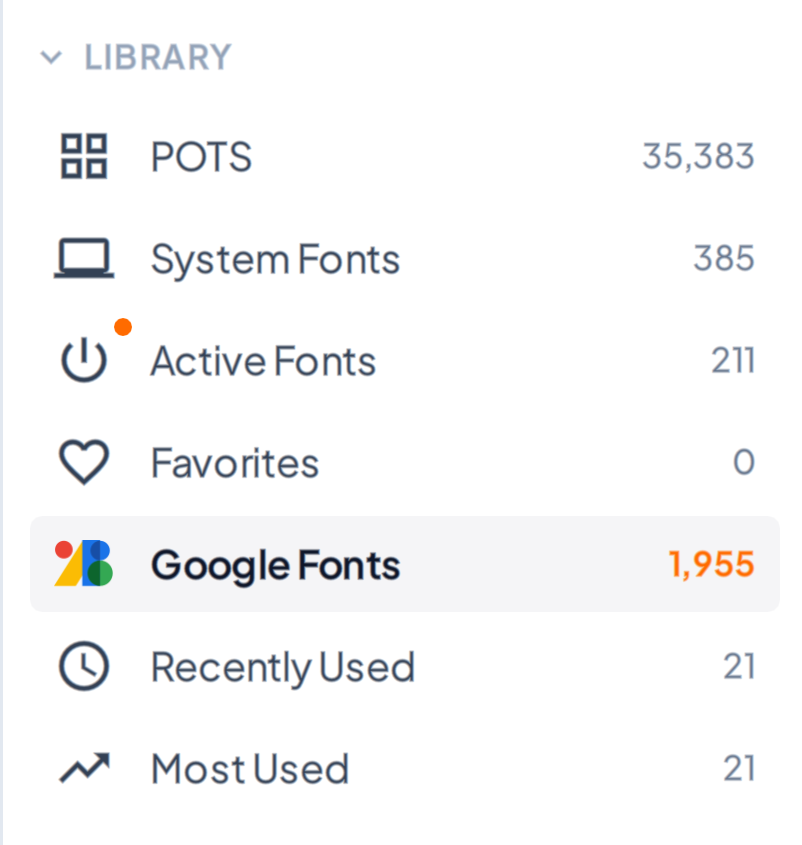
The sidebar gives you quick access to different parts of your font library, helping you navigate your collection and find the fonts you need.
Pots - Your main font library. Browse the fonts managed by TypePOT and explore your collection from one place.
System Fonts - View fonts installed on your system and explore the typefaces available on your computer.
Active Fonts - Quickly access fonts that are currently active through TypePOT, making it easier to find typefaces ready for use in your creative applications.
Favorites - Keep your favorite typefaces close at hand. Mark fonts you love and return to them whenever you need inspiration.
Google Fonts - Browse your Google Fonts collection directly in TypePOT and explore typefaces available through your connected collection.
Recently Used - Return to fonts you've used recently without having to search for them again.
Most Used - Quickly revisit the typefaces you use most often in your everyday workflow.
Browse & Preview Fonts
See the type before you choose it.
Each font entry displays a live text preview, helping you compare letterforms, proportions, and personality at a glance.
Depending on the font, you can explore details such as:

Activate / Deactivate - Activate a font to make it available for use in your creative applications, or deactivate it when you no longer need it. This helps you manage your active fonts without losing track of your collection.
Google Fonts - This icon identifies a font associated with Google Fonts, helping you recognize its source at a glance.
Font Name - Displays the font's name so you can quickly identify the typeface you're browsing. Use it to recognize, search for, and return to fonts in your collection.
Font Notes - Add or view personal notes associated with a font. Keep useful details, project references, licensing information, or reminders close to the typeface they belong to.
Family Style Count - Shows the number of styles available in a font family. This helps you understand how many variations are available without opening the family.
Font Style - Displays the font's classification, such as Sans Serif or Serif, helping you identify its general typographic style at a glance.
Timed Activation - Displays the remaining time for a temporarily activated font. This lets you see how long the font will remain active before its timed activation expires.
Font Format - Identifies the font file format, such as TTF or VAR (Variable Font). This gives you a quick reference when browsing different types of fonts.
Font License - Displays the license label associated with the font, such as OFL / FREE, Commercial, Personal Use, Etc. You can change the license category stored in TypePOT for your own organization without overwriting the original license metadata embedded in the font file. Always check the applicable license terms before using a font.
Please note: Changing a license label in TypePOT does not change the font's actual license or grant additional usage rights. Always refer to the applicable license terms when determining how a font may be used.
Customize Your Preview
Make font browsing work the way you like. Adjust the preview text and font size to see how a typeface looks with your own words and at different sizes.
Switch between available font styles to compare their appearance and find the right fit for your project.
Make Your Library Your Own
Your font library is more than a list of typefaces. It's a place to discover new possibilities, revisit familiar favorites, organize useful information, and build a collection that works for you.
Explore, experiment, and find the fonts that bring your ideas to life.